
Resume Modern
Contemporary layout with tasteful color and crisp typography. Modern without being loud.
ModernATS-FriendlyProfessional
Clean two-tone layout with a strong header and crisp section dividers. Great for tech, marketing, and product roles.
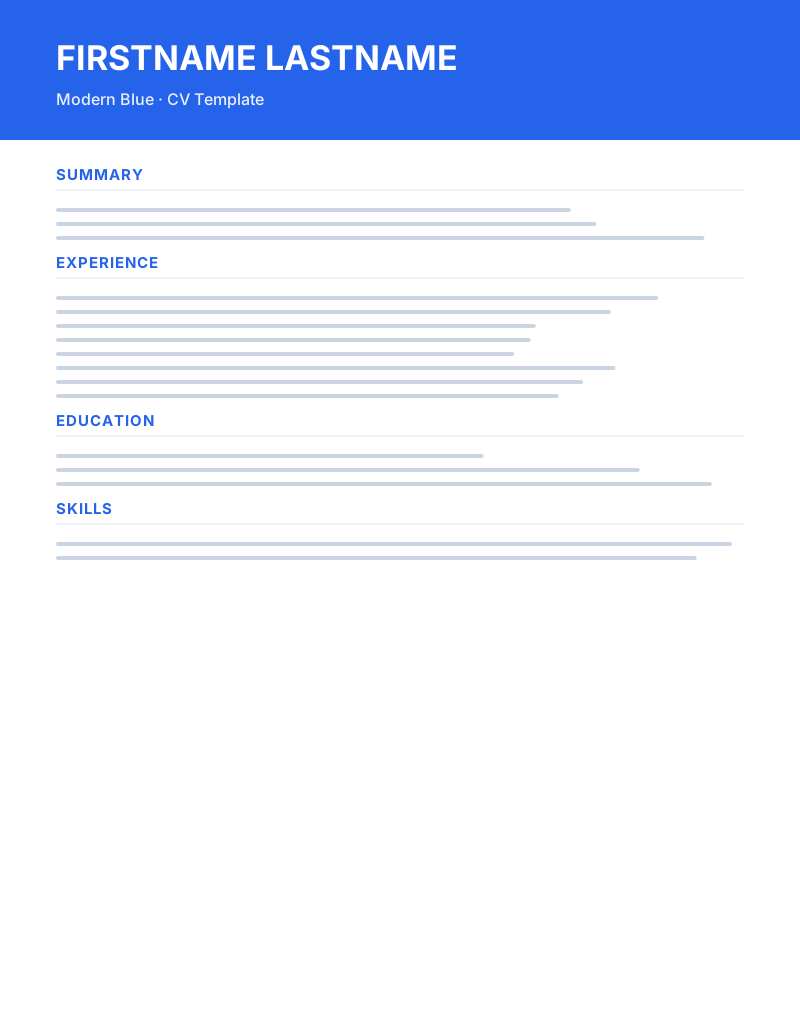
Modern Blue is a free Microsoft Word CV template designed for Software engineers, Product managers, Marketing and Tech roles. It blends a modern and ATS-friendly and professional aesthetic with a layout that recruiters can scan in under ten seconds — the average time hiring managers spend on a first pass. Clean two-tone layout with a strong header and crisp section dividers. Great for tech, marketing, and product roles. Every styling choice in this template — typography, spacing, accent color (#2563eb), and section order — was made to help your most relevant achievements surface immediately, without forcing the reader to hunt.
The document is delivered as a fully editable .docx file that works in Microsoft Word, Google Docs, and LibreOffice Writer. Styles are defined at the paragraph level, which means you can update fonts, colors, or spacing once and have the change propagate across the entire CV. There are no embedded text boxes, no exotic fonts that fail to load, and no graphics that confuse parsers. The template is built single-column with standard headings ("Experience", "Education", "Skills") so that applicant tracking systems read every word — no fields lost, no sections mislabelled. Whether you submit to a global Workday portal or a small company inbox, the layout holds up.
What makes Modern Blue different from generic Word templates is the attention paid to evidence over decoration. The header gives you exactly the space you need for a name, headline, and three contact lines — no more, no less. Below that, the summary block is sized for three to four punchy lines: enough to communicate your positioning and one quantified result before the reader scrolls. The experience section uses a compact title-and-company line followed by bulleted achievements; the bullets are pre-styled with tight leading so a typical mid-career CV stays on one to two pages without manual reflow. Key built-in features include: ATS-friendly single-column body, Editable in Word, Google Docs, LibreOffice, Standard fonts (Calibri / Arial), A4 and US Letter compatible and Clean section dividers. Each of these was added to solve a specific problem we kept seeing in real CV reviews.
This template is a particularly strong fit for candidates at any career stage, and especially for Software engineers, Product managers, Marketing and Tech roles. Use it when you want a CV that looks intentional rather than templated, and when you need to apply to a mix of automated and human-reviewed channels. If you're early in your career, lean on the summary and skills sections to compensate for shorter work history. If you're further along, trim older roles to a single line each and let the most recent two positions dominate the page. In both cases the underlying styles will keep the document visually consistent.
Practical tips for getting the most out of Modern Blue: replace the placeholder copy section by section rather than all at once, so you can see the layout breathe as you work. Quantify at least two bullets per role — numbers, percentages, scale, budget, or team size. Keep the file named Firstname-Lastname-CV.docx so recruiters can find it later in a crowded inbox, and always export a PDF copy for email attachments while keeping the .docx as your master. The template is free for personal and commercial use — no signup, no email, no watermark — and you can edit, share, and reuse it across as many applications as you need.
If you're applying for a software engineers role specifically, tailor the summary block to mirror two or three keywords from the job description — most ATS keyword scoring engines weight the top third of the document more heavily. Pair this CV with a one-page cover letter using the same font and accent color (#2563eb) to present a consistent personal brand. After exporting to PDF, open the file once in a free PDF reader and confirm the layout has not shifted; this catches the rare case where a local font substitution changes line breaks. Finally, keep a "long" master version of this .docx that contains every role you've ever had, and trim it down per application — that workflow is faster than rewriting from scratch and keeps your history searchable for your own reference.
Firstname-Lastname-CV.docx.Contemporary layout with tasteful color and crisp typography. Modern without being loud.
Built for software engineers — leads with projects, stack, and shipped impact.
Calm teal accents and a balanced layout — fresh and professional in equal measure.

